Android
Third party libraries
Created by Gonzalo
We'll see...
- Production libraries
- Development libraries
Production libraries
- Butterknife
- Retrofit
- Dagger 2
- Picasso
Development libraries
- Stetho
- LeakCanary
Butterknife

Butterknife
Jake Wharton (Google) under Apache License 2.0
Bind Android views and callbacks to fields and methods using Java anotations
Without Butterknife
public class MainActivity extends AppCompatActivity {

    TextView tvMain;
    Button btnMain;

    @Override
    protected void onCreate(Bundle savedInstanceState) {
        super.onCreate(savedInstanceState);
        setContentView(R.layout.activity_main);

        this.tvMain = (TextView) findViewById(R.id.tv_main);
        this.btnMain = (Button) findViewById(R.id.btn_main);

        this.tvMain.setText(R.string.app_name);
    }
}
With Butterknife
public class MainActivity extends AppCompatActivity {

    @BindView(R.id.tv_main) TextView tvMain;
    @BindView(R.id.btn_main) Button btnMain;

    @Override
    protected void onCreate(Bundle savedInstanceState) {
        super.onCreate(savedInstanceState);
        setContentView(R.layout.activity_main);

        ButterKnife.bind(this);

        this.tvMain.setText(R.string.app_name);
    }
}
Not just views...
@BindView(R.id.tv_main) TextView tvMain;
@BindView(R.id.btn_main) Button btnMain;
@BindColor(R.color.colorAccent) int accentColor;

@Override
protected void onCreate(Bundle savedInstanceState) {
    super.onCreate(savedInstanceState);
    setContentView(R.layout.activity_main);

    ButterKnife.bind(this);

    this.btnMain.setOnClickListener(new View.OnClickListener() {
        @Override
        public void onClick(View view) {
            tvMain.setText("Clicked!");
        }
    });
}

@OnClick(R.id.btn_main)
public void clickMain() {
    tvMain.setText("Clicked!");
}
Retrofit

Retrofit
Square, Inc. under Apache License 2.0
Use annotations to describe the HTTP request
- URL parameter replacement
- Request body conversion (JSON...)
- Multipart request body and file upload
Define Java interface
public interface PlayService {

    @GET("game/{topicId}")
    Observable<Game> getGame(@Path("topicId") long topicId, @Query("level") int level, @Query("eLevel") int englishLevel);
}
topidId = 2, level = 0 and englishLevel = 0
http://server.com/game/2?level=0&eLevel=0
Create Retrofit service
Retrofit retrofit = new Retrofit.Builder()
        .baseUrl(ENDPOINT)
        .client(okHttpClient)
        .addCallAdapterFactory(RxJava2CallAdapterFactory.create())
        .addConverterFactory(GsonConverterFactory.create(
                new GsonBuilder().setDateFormat(Constants.DATE_FORMAT).create()))
        .build();

PlayService service = retrofit.create(PlayService.class);
Call endpoint
service.getGame(2 /*topicId*/, 0 /*level*/, 0 /*englishLevel*/)
        .subscribeOn(Schedulers.io())
        .observeOn(AndroidSchedulers.mainThread())
        .subscribe(this::gameResponse, this::onError);
Manage response
private void gameResponse(Game game) {
    //Receive game object
    if(game == null)
        return;

    //Play with Game!
}
Manage error
private void onError(Throwable throwable) {
    if (throwable instanceof HttpException) {
        // We had non-2XX http error
        HttpException httpError = (HttpException) throwable;
        Toast.makeText(context, httpError.message(), Toast.LENGTH_SHORT).show();
    }
    else if (throwable instanceof IOException) {
        // A network or conversion error happened
        Toast.makeText(context, "There was a network issue. Please try again later.", Toast.LENGTH_SHORT).show();
    }
    else {
        // We don't know what happened
        Toast.makeText(context, "Unexpected error. Please try again later.", Toast.LENGTH_SHORT).show();
    }
}
File example (I)
public interface FileService {
    @Streaming
    @GET
    Call<ResponseBody> downloadFile(@Url String fileUrl);
}
Treat the response body on methods returning Response as is = without converting body() to byte[].
File example (II)
public void downloadFile(String url, String name, FileManagerListener listener) {
    Call<ResponseBody> call = fileService.downloadFile(url);
    call.enqueue(new Callback<ResponseBody>() {
        @Override
        public void onResponse(Call<ResponseBody> call, Response<ResponseBody> response) {
            if (response.isSuccessful()) {
                Log.d(TAG, "Server contacted and has file: "+url);

                new AsyncTask<Void, Void, Void>() {
                    @Override
                    protected Void doInBackground(Void... voids) {
                        boolean writtenToDisk = writeResponseBodyToDisk(response.body(), name);

                        Log.d(TAG, "File download was a success? " + writtenToDisk);
                        return null;
                    }

                    @Override
                    protected void onPostExecute(Void aVoid) {
                        listener.onDownloadFinish(true);
                    }

                }.execute();
            }
            else {
                Log.d(TAG, "Server contact failed: "+url);
            }
        }

        @Override
        public void onFailure(Call<ResponseBody> call, Throwable t) {
            Log.e(TAG, "error");
            listener.onDownloadFinish(false);
        }
    });
}
Asynchronously send the request and notify callback.
More annotations...
// Other HTTP Requests
@POST("user/edit")
@PUT("user/photo")

// Simple and multiple headers
@Headers("Cache-Control: max-age=640000")
@Headers({
    "Accept: application/vnd.github.v3.full+json",
    "User-Agent: Retrofit-Sample-App"
})
Dagger 2
Dagger 2
Adaptation of Dagger (Square) and now maintained by Google
Fully static, compile-time dependency injection framework for Java and Android
Declaring Dependencies
public class LoadGamePresenter extends BasePresenter<BaseView> {
	private PlayService service;

	@Inject
	LoadGamePresenter(PlayService service) {
	    this.service = service;
	}
}
Satisfying Dependencies
@Module
public class AppModule {
    @Provides
    PlayService providePlayService() {
        Retrofit retrofit = new Retrofit.Builder()
                .baseUrl(BASE_URL)
                .client(new OkHttpClient())
                .addCallAdapterFactory(RxJava2CallAdapterFactory.create())
                .addConverterFactory(GsonConverterFactory.create(
                        new GsonBuilder().setDateFormat(Constants.DATE_FORMAT).create()))
                .build();

        return retrofit.create(PlayService.class);
    }
}
You can use @Singleton
Generating component
@Singleton
@Component(modules = AppModule.class)
public interface AppComponent {
    LoadGamePresenter createLoadGamePresenter();
}
public class App extends Application {

    private AppComponent component;

    protected AppComponent createComponent() {
        return DaggerAppComponent.builder()
                .appModule(new AppModule(this))
                .build();
    }

    public static AppComponent getAppComponent(Context context) {
        App app = (App) context.getApplicationContext();
        if (app.component == null) {
            app.component = app.createComponent();
        }
        return app.component;
    }
}
Injection in action
Get Application reference and call Component injector
public class LoadGameFragment extends BaseFragment<BaseView, LoadGamePresenter> implements BaseView{

    public LoadGameFragment() {

    }

    @Override
    protected LoadGamePresenter createPresenter() {
        return App.getAppComponent(getContext()).createLoadGamePresenter();
    }
}
Picasso
Picasso
Square, Inc. under Apache License 2.0
A powerful image downloading and caching library
- ImageView recycling in adapters
- Image transformations with low memory use
- Automatic memory and disk caching
So simple as
Picasso.with(context)
    .load(url)
    .resize(50, 50)
    .centerCrop()
    .placeholder(R.drawable.user_placeholder)
    .error(R.drawable.user_placeholder_error)
    .into(imageView);
Stetho
Stetho
Facebok, BSD-licensed
A debug bridge for Android applications
- Network Inspection
- Database Inspection
- View Hierarchy
- And more... just with Chrome!
Init in App creation
public class App extends Application {

    public void onCreate() {
        super.onCreate();

        //Debug chrome
        Stetho.initializeWithDefaults(this);
    }
}
And start inspecting!
Chrome inspection
Navigate: chrome://inspect


Network inspection
@Module
public class AppModule {
    @Provides
    PlayService providePlayService() {
	OkHttpClient okHttpClient = new OkHttpClient.Builder()
	    .addNetworkInterceptor(new StethoInterceptor())
	    .build();
        Retrofit retrofit = new Retrofit.Builder()
                .baseUrl(BASE_URL)
                .client(okHttpClient)
                .addCallAdapterFactory(RxJava2CallAdapterFactory.create())
                .addConverterFactory(GsonConverterFactory.create(
                        new GsonBuilder().setDateFormat(Constants.DATE_FORMAT).create()))
                .build();

        return retrofit.create(PlayService.class);
    }
}
LeakCanary

LeakCanary
Square, Inc. under Apache License 2.0
A memory leak detection library for Android and Java
Init in App creation
public class App extends Application {

    public void onCreate() {
        super.onCreate();

        //Debug memory
        if (LeakCanary.isInAnalyzerProcess(this)) {
            // This process is dedicated to LeakCanary for heap analysis.
            // You should not init your app in this process.
            return;
        }
        LeakCanary.install(this);
    }
}
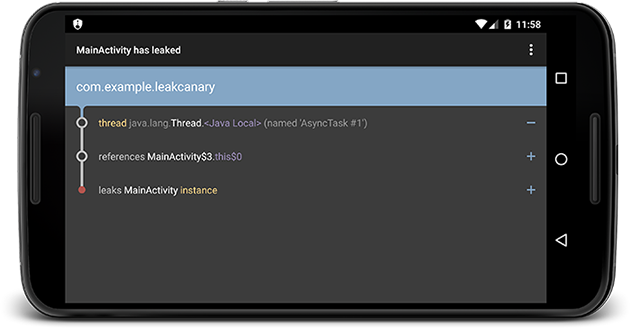
And start crying!
An App will be installed to see memory leaks

LeakCanary will automatically show a notification when an activity memory leak is detected